Showing posts with label campaigns. Show all posts

Thursday, February 27, 2014

Why Socially Adept and Knowledgable Introverts Might Have the Best Traits for Modern Sales/PPC Managers

Extroverts are traditionally the ones to be considered to be the best marketers - they are capable of having conversations with others, and so, were able to go in, schmooze the manager up to the owner, then make the sale. They could bully a person into adding that extra option on their new car. They could call a business and convince them to use your product... Then search engines had to come along and flip the entire marketing industry on it's head.


Thanks to the internet and how it's changed economies and societies in such a short time, I believe that the best salesmen of the near future will be Introverts rather than Extroverts, but only the ones who can understand/empathize with their target end user.

Just to clear the air, I'm going to go ahead and say that most of the people claiming to be introverts might just be lying to themselves, because you know, being extroverted is so passe. I actually cringed writing the end of that last sentence.

Fictional Example Time:
(Just bear with me for the following - there are points being made, I swear.)

You're a business owner in the late 80's hiring someone to drive sales of your Doohickey (Trademarked) over the phone and in person to distributors and retailers. You put up a listing in the local Penny-Saver -

"SALESMAN WANTED WITHIN THE WEEK! 
Needs the Gift of Gab and the Drive of a Bull!"

Only two people show up three days later, partially because there was an accident with the Penny-Saver van (Why do they let the town drunk drive the delivery van?!), and the issue that you bought advertising space in only got delivered to the less popular grocery stores in town that week. Good Lord! Only if there was a paperless delivery system that could be magically accessed whenever for this sort of thing. But enough with the crazy talk, let's get to the candidates.

Larry shows up in a button down and jeans, seems polite enough and answers all of your questions in a thoughtful manner with good questions of his own, but stutters a little bit through his interview.

Then Joe shows up dressed in a Brooks Brothers suit, gives you a knuckle-popping handshake and a big grin, and answers all of your questions enthusiastically, but keeps talking about himself and why he's the best darn salesman to have ever walked this earth and never asks a single question.

"Well," you think, "Larry seems like a nice kid, but he couldn't go in and close a sale to save his life. Joe can push a conversation towards a sale, or at least he tells me he can. Too bad he has the personality of a cheese grater."

You go out to the waiting room and give Joe the sales position but you at least take Larry out for a beer because you feel he would be pleasant to have a conversation with.

While sipping your beer, you muse about what a ridiculous situation this was and a small voice in the back of your head wonders why you didn't just try to wait at least a couple days for more realistic candidates before making the decision like a sane person. But as it turns out, Larry is a huge fan of those new-fangled "microbrews" that started getting popular, just like you! So you start talking and buy a couple more rounds, then have too many beers with Larry, feel bad for him, and give him a temp job making your print ads because he at least has a background in art from high school.

This is the story of many introverts looking for a job in marketing even now.

Real fast, a review:
Introverts: Need time alone after social interaction
Extroverts: Need social interaction after time alone

Notice that being awkward and socially inept isn't in the introvert description? Because it isn't. You can be a socially adept introvert, or a socially inept extrovert. It's just that the inverse set is a bit more common noticed.

Socially Adept Introvert means that they aren't completely ignorant of social norms and human emotion - this is important because one still needs to understand the psyche of the end user and the stage of the buying cycle they are in as well as the things they value in the product they are searching for to pique interest and close the sale.

The key to this argument is in the previous sentence: "they are searching for."

THEY are SEARCHING for.
they SEARCHing.
SEARCH.

When Joe the Fictional 80's Salesman goes into a business and asks for a minute of time to tell the manager or owner about the Doohickeys, Joe is trying to get them to listen. Joe is trying to aggressively push in and get his pitch in, stir up interest, and make the sale before they have a chance to say no or a competitor catches their eye and robs him of the opportunity.

With the internet, Modern Joe is still be useful in sales, but mainly be there to close the sale on someone who was directed to him via a web search result, ready to hear about the Doohickey he has to offer, the path to the sale all planned out by Modern Larry.

With Search PPC advertising like Adwords, you're aiming to get the attention of someone who might be ready to hear your message because the person asked the almighty knowledge machine Google about something related to what you're selling. They search, the Adwords algorithm takes into account your campaign info, weighs it against your competitors, and hopefully, you catch their attention and close the sale, possibly without a second of human interaction needed.

Take in/Predict the energy of the customer who is reaching out to you, and redirect the force into your planned sales funnels.

This is marketing Judo. (Aikido, if you dislike contact sports)

To do this, the person aiming to make the sale must have some level of these three characteristics:

Patience - The ability to wait for the consumer to come to them
Empathy - The ability to anticipate why the consumer would come to them
Creativity - The ability to impress the consumer who has come to them

From personal experience, I have found these particular traits most common in those I label Social Adept Introverts, and if you combine this with a want to study and learn, then you have the best characteristics for the modern marketer/PPC manager.


Disagree? Comment below.

Friday, December 13, 2013

GMail Image Caching - Better for Security, Worse for Marketing

What Does the New GMail Image Caching Update Mean for Email Marketing? 

Direct from Google:
Have you ever wondered why Gmail asks you before showing images in emails? We did this to protect you from unknown senders who might try to use images to compromise the security of your computer or mobile device.
But thanks to new improvements in how Gmail handles images, you’ll soon see all images displayed in your messages automatically across desktop, iOS and Android. Instead of serving images directly from their original external host servers, Gmail will now serve all images through Google’s own secure proxy servers.

So what does this mean for you? Simple: your messages are more safe and secure, your images are checked for known viruses or malware, and you’ll never have to press that pesky “display images below” link again. With this new change, your email will now be safer, faster and more beautiful than ever.
http://gmailblog.blogspot.com/2013/12/images-now-showing.html

How Images Were Used for Email Marketing

Images have served a very important function in email marketing. Images are used to track email opens and engagement while providing marketers with valuable data about when, where, and how their campaigns are being read.

Email tracking relies on a unique image being included in a campaign and that image being downloaded and displayed within the email. Every time the image is downloaded from the server, the tracking software marks that as an email open. Combined with things like click tracking and site analytics, open tracking via images helps give marketers a comprehensive view of how people are interacting with their campaigns.

To count opens reliably, software tools need those images to be downloaded every time someone opens an email. Gmail has started caching images for users accessing Gmail via the web interface: images are viewed only once on the original server while successive views will originate from the cached image on Google’s proxy servers.

What This Means for Marketers' Analytics and Users' Privacy

The main problem for marketers is that the unique downloads that tracking software looks for will no longer occur. Analytics tools will only see the initial download by Google and won’t record subsequent opens regardless of how many times a reader opens that email.

Some marketers also use geolocation to personalize email messages. They look at where the image is downloaded and feed users dynamic content based on their location. With Gmail’s new image caching behavior, geolocation could effectively break. Instead of being able to see where a reader is located, these services will see where Google’s proxy server is located—resulting in dynamic content tailored to the proxy server’s location.

On the flip side, now all spammers have a way of validating your address, since only images sent to valid Gmail addresses will be accessed.

As mentioned previously, marketers can send out an email with unique image names (easily done from their CDN or wherever) and when that image is loaded they'll know that that particular person opened it. Thus, the email was viewed. They can use this for test-and-target or AB testing on subject names, and also modify the images to lead to higher clickthroughs.

The proxying is only a privacy enhancement for people who already loaded images by default, and is actually a net loss in privacy for users who never loaded images. Now everyone will load images by default, and privacy-aware users will have to take action to gain that privacy back.In all cases the marketers won't get your IP and useragent - good or bad depending on perspective.


Hope this article cleared a few things up.

Tuesday, December 10, 2013

How to see keywords users typed, not keywords you bid on, in Analytics or Adwords

Adwords Tips: How do you see keywords users typed, not keywords you bid on, in Analytics or Adwords Campaign Manager?


As far as most new users can tell, Google only shows them how many people search for a keyword you have bid on, it doesn't show them exactly what the user searched for. If the advertiser goes to the Keywords > Details > All list in Adwords, it doesn't show all of the searches.

For example, if they search for "where can I drink Imperial Honey Stout", and they click on an ad triggered by the broad term "Imperial Honey Stout", the advertiser can easily see "Imperial Honey Stout" triggered an ad, but is there any way to see that the user searched for "where can I drink Imperial Honey Stout"?

This is just a matter of digging slightly deeper into either Adwords or Analytics

Matched Keyword Query in Adwords


In Google AdWords,

Go to the Keyword tab
Click the gray "Details" button
Under Search Terms choose "All"- This shows the exact phrases people searched for which triggered your ads, including searches that did not generate any clicks.


Matched Keyword Query in Analytics


In Google Analytics

Acquisition > Adwords > Matched Search Queries
Change Secondary Dimension to Keywords - This shows the term searched for against the keyword that triggered the ad.

e.g.
Matched Search Query = where can I drink Imperial Honey Stout
Keyword = Imperial Honey Stout

Adwords and Analytics will need to be linked.

Saturday, December 7, 2013

How to Set Up Phone Ad Extensions & Protect Yourself From Robo-Dialers

How to Set Up Phone Number Ad Extensions on Adwords & Benefits for Businesses


Pictured: Not how robocalls work.

First, why people use call extensions and Google's sales pitch:

Why you'd use it


  • Make it easy for mobile users to call you when they're on the go.
  • Easily add your phone number to ads across an ad group or an entire campaign.
  • Schedule call extensions to show when your business is ready to take calls.
  • Understand the effectiveness of your ads by counting the calls that lead to conversions. Learn more about call conversions.
  • Get a higher clickthrough rate. AdWords advertisers have typically seen a 6-8% average increase in clickthrough rate after adding call extensions.

Watch this video from Google on how to set one up:


Now, these extensions are wonderful for many businesses to get highly relevant hits. A very specific example: a restaurant sets up a phone extension on a ad targeted by the following

  1. Within a 5 mile radius of their location
  2. Mobile devices 
  3. Scheduled between 10AM to 2PM & 5PM to 9PM

Now, all people in a walking distance looking for that style of restaurant on a whim during lunch and dinner hours are given a heads up by Adwords that this business might be the right pick for them, and they can just tap the number shown on the ad to set up a reservation with ease. A highly targeted campaign that will only use up the advertising budget to a likely potential customer, so you can see the obvious advantages to using these extensions.

Whether you are a restaurant or a lawyer's office, having the local business information and phone number listed adds both transparency and something to act upon, so an extension might be a good way to supplement your existing Adwords PPC strategy.

How to Protect your Adwords budget from Robodialers 


Unfortunately, there are plenty of unscrupulous uses of search engines, and one of them is to have a computer program scrape search results for phone numbers and dial them. If your ad is showing for a particular keyword the program is targeting, the robodialer may click through and call your number to send marketing information or check who is on the other end. This action will count as a click in Adwords, and may start draining your advertising budget.

These two tips are not foolproof nor are they effortless, but may be necessary to protect your advertising investment from worthless clickthroughs from annoying telemarketers.

  1. Record & Report to Google

    If you are recording the calls (many of my clients do through a call tracking software), provide the recordings as evidence and report the invalid clicks.
    Explanation of Invalid Clicks
    Google's protection against invalid clicks
  2. Get on the Do Not Call Registry and Private Do Not Call Lists

    This step will just make it less likely that a worthless click will go through:

    The National DNC list: https://www.donotcall.gov/‎

    The National Do Not Call list prevents companies that do not have a business relationship with you from calling you. This isn't foolproof, so when a company calls you, you should get into their company's do not call list as well.

  3. Some additional details about the Do Not Call Registry and the TCPA:

    If you are on the National DNC list You can still get telemarketing calls! If you have a business-client relationship (say a Bank of X checking account) Bank of X can call you about products and services. You can also still receive political and non-profit calls.

    So when you get a telemarketing call on behalf of a company and asked to be put on their do-no-call list (a method that only works for respectible call centers), you'll be put on that client's do-not-call list. This means that you won't get any calls on any offers from that client. However, since most call centers have anywhere from 5-20 different clients at once, you're most likely still in the system for at least one of those other lists.

    A better way to deal with that is to speak to a supervisor, ask them what call center they're calling from, and request to be put on the call center's do not call list. This disables the call center from calling you.

    According to TCPA (telephone consumer protection act.), telemarketers cannot:

    Call before 8am or after 9pm
    Call your cell phone
    Hide who they are or who they're calling on behalf of
    Call you if you're on the national do not call list call with a pre-recorded message (unless within the first 4 seconds of a call, the rep must reveal who they are, where they're calling from, and who they're calling on behalf of.)

    If a telemarketer breaks any of these rules, you can sue them then add the $500 fine to your Adwords budget :)


I hope this article helps, and despite the one potential drawback of encouraging robodialing, phone ad extensions are still incredibly useful to a complete PPC strategy, and as shown above, the issue can be dealt with.

Tuesday, December 3, 2013

Encrypted Search Makes Adwords PPC a Priority in Online Marketing Strategy

How Encrypted (HTTPS) Search Makes PPC and Content Marketing a Priority in Online Marketing Strategy


What the Google Analytics page of most small business owners looks like right now.
Google recently switched over all searches to HTTPS/Encrypted search, making most keyword Analytics data invisible... and online marketers and small business owners around the globe gasped in unison. Thankfully, it was not the end of the world, because keywords and SEO are not the end all be all of a real search marketing strategy.

However, the disappearance of the majority of the keyword data was still pretty hard on small business owners trying to run their own SEO for their business, because it was not just about figuring out which keywords they should focus on. It was about figuring how people are actually finding them.

So in the past, we could say to a client "look, you got x of hits from 'keyword1' and y of hits from 'keyword2,' so we should do this and this and that..." A lot of clients got used to hearing it that way. So the change doesn't affect the job that SEOs do nearly as much as it effects how they report that job to the client. Now, it's just (not provided).

In combination with all of the updates and news in the past, Google's search endgame has always been the same - provide users with the best search results and balance it with their Adwords PPC platform.

4 Major Points in Recent Google SEO History:


  1. Adwords started giving advertisers a bid discount for having a high quality landing page with good content.
  2. Panda targeted and penalized bad and scraped content. 
  3. Penguin hit people who "over optimized" using shady but widespread anchor text link buying techniques.
  4. Google moves to encrypted search.


So, with the search being encrypted, the advantage of Adwords PPC becomes apparent: keyword data is open to analyze, and the data can be combined with the data still provided by Analytics to create a non-"over optimized" content strategy and base a creatively organized Adwords campaign around this natural strategy to supplement.

Given these these factors, the next stage of SEO and SEM is what it was always trying to reach - original and organic content, and actively optimized Pay-Per-Click campaigns.

Stay tuned for more on the subject. In the mean time, if you would like us to consult you on your company's PPC and content strategy, contact Rabbit today!

Thursday, November 28, 2013

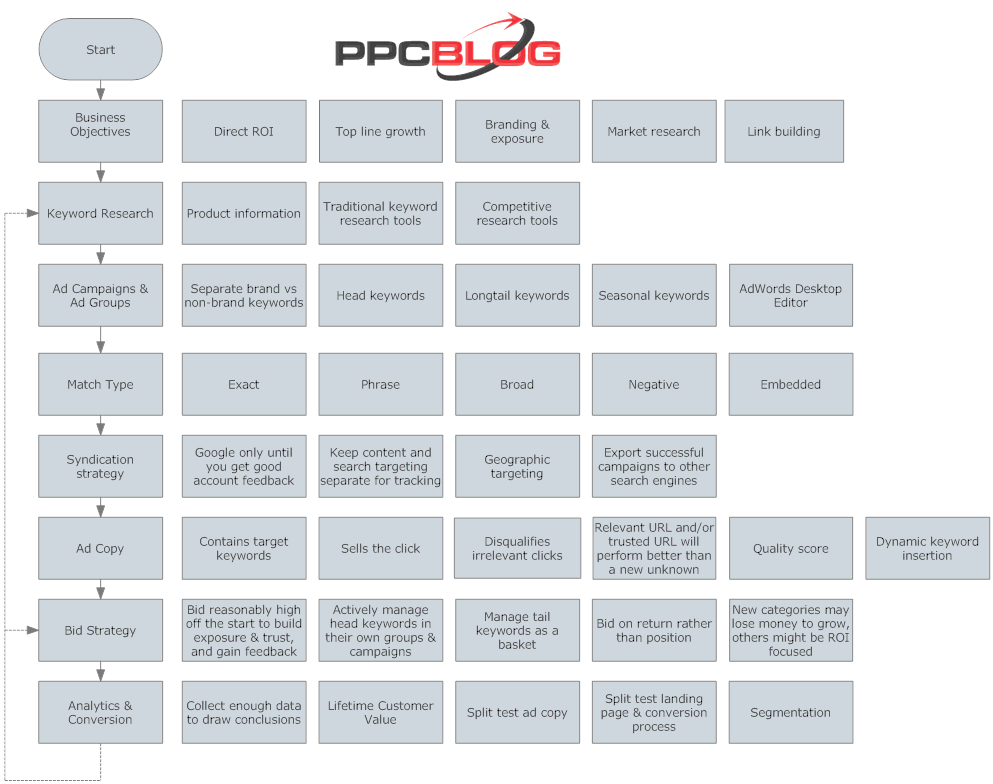
Simple But Effective PPC Flowchart

Not really sure why it's a GIF, but ok.
This flowchart from PPC Blog does a pretty decent job of outlining the implementation and refinement of a Pay-Per-Click Campaign.

Left side is flow from top to bottom, right is purpose and details. 

Roughly translates into:

  1. Start by defining Business Objectives and the expectations and needs from PPC advertising
  2. Do Keyword Research by tapping into available information and keyword tools
  3. Build initial Ad Campaigns & Groups based upon targeted demographics and relevant keyword groupings
  4. Define Match Type based upon range of relevant searches for targeted keywords
  5. Create Syndication Strategy for additional targeting methods and other search engines
  6. Write high quality Ad Copy to attract relevant attention and improve Quality Score
  7. Manage Bid Strategy based upon needs and budget
  8. Analyze your results, and use data to refine Keyword Research and Bid Strategy

This picture is a bit outdated, because it doesn't take into account Remarketing (targeting people who have already visited your site), but is still a solid flowchart.