 |
| User Experience - Intended design doesn't have anything to do with the reality of usage |

Showing posts with label picture. Show all posts
Showing posts with label picture. Show all posts
Thursday, January 22, 2015
UX Design - Theory vs Reality (Summed Up in a Picture)

Wednesday, June 18, 2014
Indian Wedding Elephant Art - Free Desktop Wallpaper
 |
| Indian Wedding Elephant Click for FULL SIZE Posterized over gradient background and hand drawn accents in Photoshop 1600x1200px |
Tuesday, June 17, 2014
A Simple Picture Guide to Computer and A/V I/O Ports
Just something useful - as some one who frequently has to check boxes full of cables to fix other people's problems, here is a good picture of most of the input/output ports you'll see. It's a bit dated, so things like HDMI aren't on here, but this is still handy.
 |
| So many port styles! |
Tuesday, May 27, 2014
Most Popular Messaging Apps for Android by Country
The Most Popular Android OS Mobile Messaging Applications by Country

From: wikibrains.com/map/537b4380e4b0568301250e61#.U4Vc8ShZjn8
Facebook Messenger
USPoland
Denmark
Belgium
Australia
Czech Republic
Norway
France
Canada
Hungary
Slovakia
Portugal
New Zealand
Sweden
Viber
RussiaBulgaria
Greece
Kuwait
Ireland
Ukraine
Line
ThailandJapan
Taiwan
Skype
PhilippinesKakaotalk
South KoreaBBM
IndonesiaRomania
United Kingdom
Chile
Turkey
Saudi Arabia
Austria
Germany
Netherlands
Israel
Brazil
South Africa
Italy
Mexico
Hong Kong
Finland
Malaysia
Argentina
Switzerland
United Arab Emirates
Singapore
India
Eygpt
Sunday, March 23, 2014
How Much Should I Pay For a Small Business Logo and Card Design?
 |
| How much do you think this cost? |
"How much should my business logos, branding, and designs cost? Artists are a dime a dozen, right? It can't be that much."
This is one of the most common questions ever in the business world, especially now that start ups are coming along left and right, and is probably one of the most frustrating parts of being a designer due to misconceptions about the design world. Thankfully, I found a post that answers this question in the most straightforward way I've ever seen, and breaks it down to real monetary amounts.
The initial question:
I want to pay someone to design a logo for a company. How much should I expect to pay for something of quality?
Reply from reddit user /u/jessefletcher of www.jessefletchercreative.com
Your price request seems to have stirred up people a bit and the info may be confusing. The thing with logo design is that it is very dependent on the client and scope, and people not really knowing either of these about you makes it difficult to estimate. Here is what I would expect in terms of pricing:
$50-$300
Junk for the most part, the logo will be generic, quick and typically a knockoff of something that already exists, you will find students and overseas competitors in this bracket
$300-$1000
This will get you something solid that reflects your company to some extent but it will but just a logo, it may have some proper fonts to go with it, some Pantone colors and that's it. You will find freelancers and print shops in this bracket.
$1000-$5000
This will be your meat and potatoes, proper resource should be done at this level, looking into competitors, brand usage and guidelines should be generated. This will reflect your company and the "feel" that you want, and may include some other elements like business card designs. You will find freelancers and design firms in this bracket
$5000-$20,0000
This is much more of a branding package, it is the logo properly researched and then implemented into the company, how it works on cards, letterhead, photography, jackets, vehicle wraps, building signage, promotional items, website etc... (Note: this is not the building of those things though it could include it, just how the brand would be implemented into it) this would typically be handled by design firm.
$20,000+
These are bug corporations, cities, countries and the Olympics. Most the cost of this is implementation, usage cases and perceived value. Usually this would be handheld by an internationally recognized firm.
These are just guidelines based on what I have seen. You could get the perfect logo for $20 but it would be a random rare shot.
~~~~~~~~~~~~~~~~~~~~~~~~~~
From Rabbit's Perspective:
Great and straightforward answer from Mr. Fletcher, and from our perspective, because we work primarily with local small businesses, we have our logo design price level at the freelancer/print shop range. Any higher, and many of these business owners would have sticker shock because they don't understand the value of a good design, but since it's such a low price, I have to impose very strict guidelines, such as number of redesigns and touchups I will do before having to charge more.
Regardless, I hope this clarifies the issue for people searching for professional designs.
Wednesday, March 12, 2014
Magus - DOTA 2 Clan Logo Design
Here's a set of logos I made for a DOTA 2 clan, Magus.
For those of you that don't know, DOTA = Defense of the Ancients, one of the most popular Free-to-Play games on the market.
To the Magus guys - best of luck on your endeavors, and kick some ass at tournaments so the world can see the awesome logos I made for you guys.
 |
| b0mb3r |
 |
| benolot |
 |
| flawless |
 |
| Mutex |
 |
| TurtalyTurtle |
Friday, March 7, 2014
Reddit /r/freedesign - Brainstormville logo
Every once in a while we'll browse Reddit's /r/freedesign and pick a request based on merit/interest/however we're feeling at the moment.
Guidelines:
No revisions
No more than 30 minutes of work
No one obviously looking to exploit free labor
This week: Brainstormville.
 Hope /u/charizzardd likes it.
-Rabbit
Need a logo? http://www.r4bb1t.com/p/design.html
Guidelines:
No revisions
No more than 30 minutes of work
No one obviously looking to exploit free labor
This week: Brainstormville.
[Request] Need a logo for my consumer product design company. The company's name is Brainstormville, ideally play on the brainstorm of it. I was thinking a cartoony brain as a cloud raining or a storm coming from it. I have no artistic ability to do this. Thanks!
I'll gladly add a blog post about you or promote you on our company page once we publish it!Result:
-Rabbit
Need a logo? http://www.r4bb1t.com/p/design.html
Tuesday, February 18, 2014
Big Data Explained in One Funny Powerpoint Slide
 |
| "Everyone thinks everyone else is doing it. So, everyone claims they are doing it." Hilarious. |
Friday, January 17, 2014
RiNo Larimer Street Art - Denver Graffiti Murals (Part 2/2)


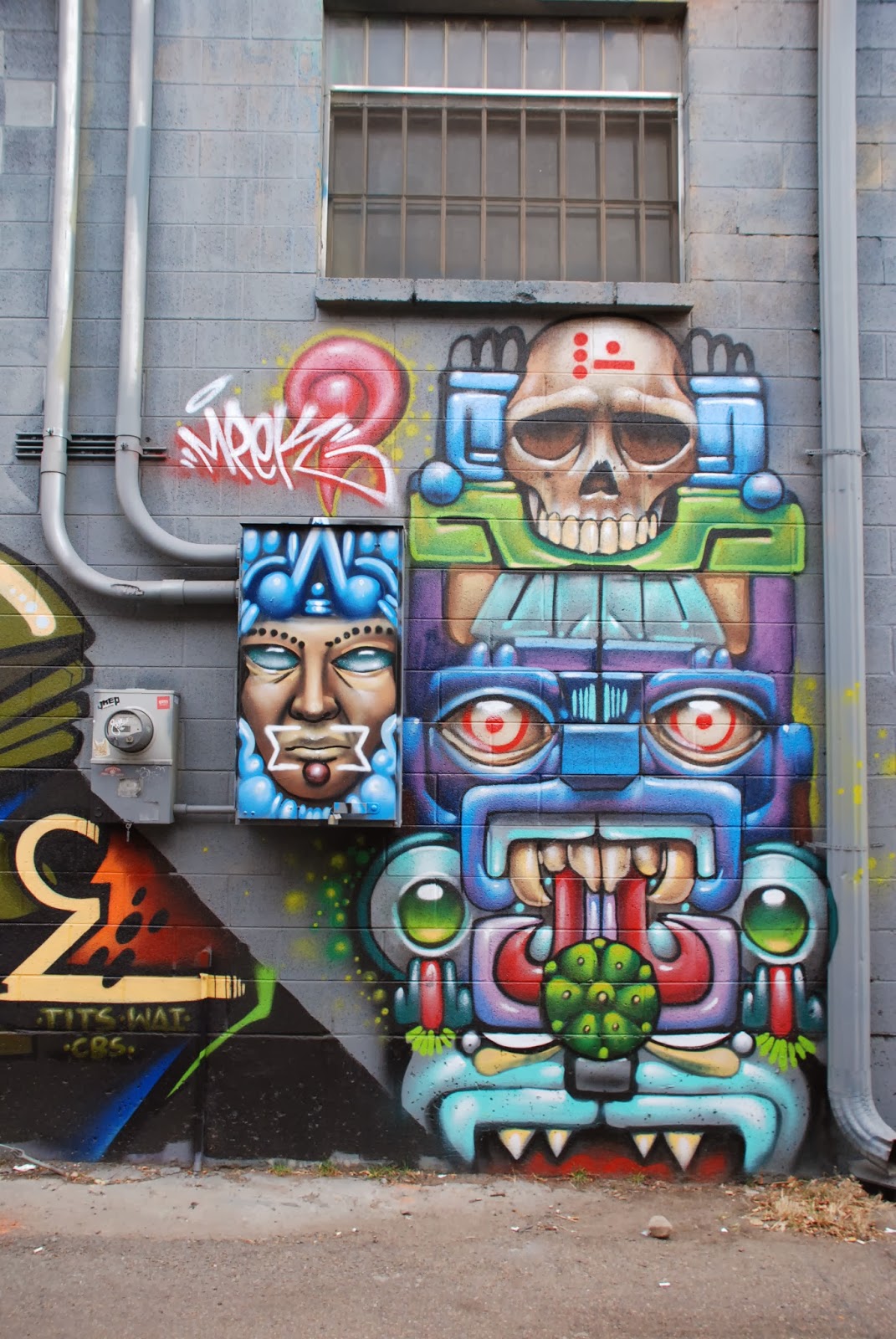
RiNo Larimer Street Art - Denver Graffiti Murals (Part 1/2)


Tuesday, January 7, 2014
Photos of Larimer Businesses (RiNo / Curtis Park - Denver)
All Photos by - Rabbit LLC, Denver
 |
| Meadowlark 64 - Glass Shop |
 |
| B-Cycle Rack on Larimer/28th |
 |
| Programming recruitment firm |
 |
| Sacred Heart Church |
 |
| Cold Crush - Bar |
 |
| Empire |
 |
| Our Mutual Friend - Brewery |
Thursday, January 2, 2014

Tuesday, December 31, 2013
Happy New Year! Google Trends by Year (Pic)
 |
| Google Searches by Year - Obvious, but still really pretty. |
Saturday, December 14, 2013
How to Use Google Search Like a Pro (Infographic)
How to Use Google Like a Boss - Simple Picture Guide

"" - Quotes
Searches for exact keyword or phase
Searches for exact keyword or phase
- - Dashes
Negative match to exclude results with that keyword or phase
~ - Tildes
Includes synonyms to results

site: - Site Query
Searches for pages within a specific site
link: - Link Query
Searches for pages that link to a specific site
.. - Two Periods
Adds range of numbers to query like date or measurements
related: - Related Query
Finds sites related or similar to a specific site
Friday, December 13, 2013
GMail Image Caching - Better for Security, Worse for Marketing
What Does the New GMail Image Caching Update Mean for Email Marketing?
Direct from Google:Have you ever wondered why Gmail asks you before showing images in emails? We did this to protect you from unknown senders who might try to use images to compromise the security of your computer or mobile device.http://gmailblog.blogspot.com/2013/12/images-now-showing.html
But thanks to new improvements in how Gmail handles images, you’ll soon see all images displayed in your messages automatically across desktop, iOS and Android. Instead of serving images directly from their original external host servers, Gmail will now serve all images through Google’s own secure proxy servers.
So what does this mean for you? Simple: your messages are more safe and secure, your images are checked for known viruses or malware, and you’ll never have to press that pesky “display images below” link again. With this new change, your email will now be safer, faster and more beautiful than ever.
How Images Were Used for Email Marketing
Images have served a very important function in email marketing. Images are used to track email opens and engagement while providing marketers with valuable data about when, where, and how their campaigns are being read.Email tracking relies on a unique image being included in a campaign and that image being downloaded and displayed within the email. Every time the image is downloaded from the server, the tracking software marks that as an email open. Combined with things like click tracking and site analytics, open tracking via images helps give marketers a comprehensive view of how people are interacting with their campaigns.
To count opens reliably, software tools need those images to be downloaded every time someone opens an email. Gmail has started caching images for users accessing Gmail via the web interface: images are viewed only once on the original server while successive views will originate from the cached image on Google’s proxy servers.
What This Means for Marketers' Analytics and Users' Privacy
The main problem for marketers is that the unique downloads that tracking software looks for will no longer occur. Analytics tools will only see the initial download by Google and won’t record subsequent opens regardless of how many times a reader opens that email.Some marketers also use geolocation to personalize email messages. They look at where the image is downloaded and feed users dynamic content based on their location. With Gmail’s new image caching behavior, geolocation could effectively break. Instead of being able to see where a reader is located, these services will see where Google’s proxy server is located—resulting in dynamic content tailored to the proxy server’s location.
On the flip side, now all spammers have a way of validating your address, since only images sent to valid Gmail addresses will be accessed.
As mentioned previously, marketers can send out an email with unique image names (easily done from their CDN or wherever) and when that image is loaded they'll know that that particular person opened it. Thus, the email was viewed. They can use this for test-and-target or AB testing on subject names, and also modify the images to lead to higher clickthroughs.
The proxying is only a privacy enhancement for people who already loaded images by default, and is actually a net loss in privacy for users who never loaded images. Now everyone will load images by default, and privacy-aware users will have to take action to gain that privacy back.In all cases the marketers won't get your IP and useragent - good or bad depending on perspective.
Hope this article cleared a few things up.
Denver Graffiti Street Art in RiNo | Curtis Park
Just a couple of the pictures taken of the street art down the alleys of Larimer St in River North/Curtis Park in Denver - This section is right by 27th and Larimer.
All pictures by Rabbit LLC - feel free to use them with attribution.


Saturday, November 30, 2013
Social Media Explained by Donuts
 |
| G+ is also: "Why the hell do I need a Google+ account to comment on a video about donuts?" |
Thursday, November 28, 2013
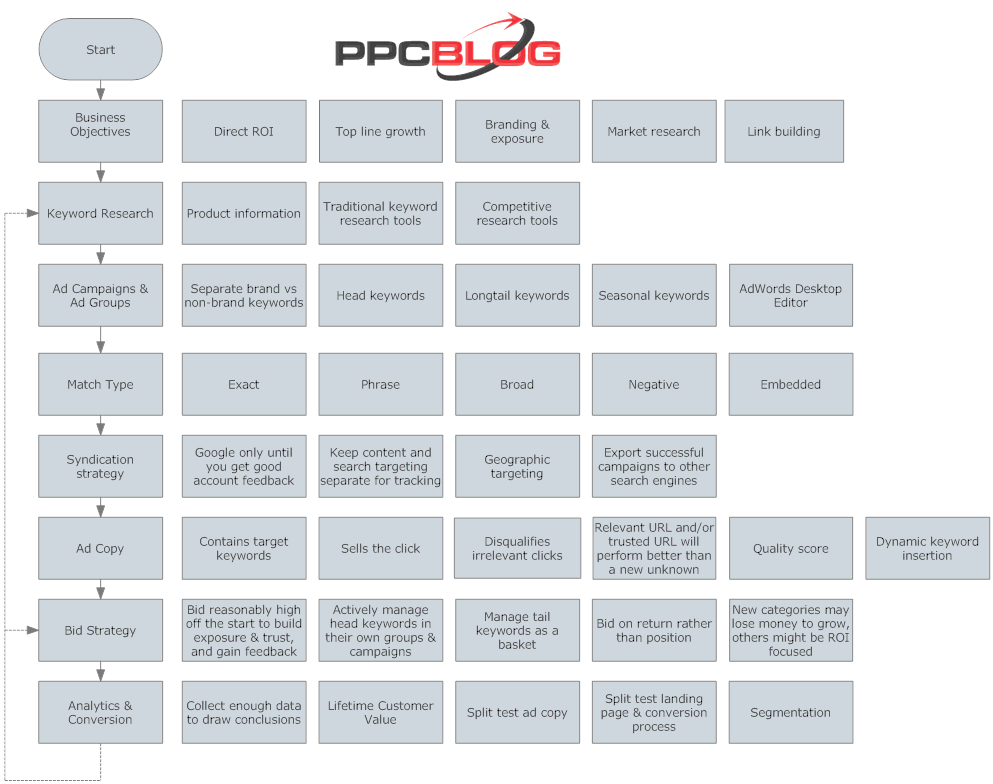
Simple But Effective PPC Flowchart
From PPC Blog : http://tools.ppcblog.com/flowchart/ppc-flowchart.gif
 |
| Not really sure why it's a GIF, but ok. |
This flowchart from PPC Blog does a pretty decent job of outlining the implementation and refinement of a Pay-Per-Click Campaign.
Left side is flow from top to bottom, right is purpose and details.
Roughly translates into:
- Start by defining Business Objectives and the expectations and needs from PPC advertising
- Do Keyword Research by tapping into available information and keyword tools
- Build initial Ad Campaigns & Groups based upon targeted demographics and relevant keyword groupings
- Define Match Type based upon range of relevant searches for targeted keywords
- Create Syndication Strategy for additional targeting methods and other search engines
- Write high quality Ad Copy to attract relevant attention and improve Quality Score
- Manage Bid Strategy based upon needs and budget
- Analyze your results, and use data to refine Keyword Research and Bid Strategy
This picture is a bit outdated, because it doesn't take into account Remarketing (targeting people who have already visited your site), but is still a solid flowchart.
Subscribe to:
Posts (Atom)